![Logo Aqurate White.png]](https://aqurate.ai/hs-fs/hubfs/Logo%20Aqurate%20White.png?height=40&name=Logo%20Aqurate%20White.png)
📊 Overview of Aqurate’s Searches Impact
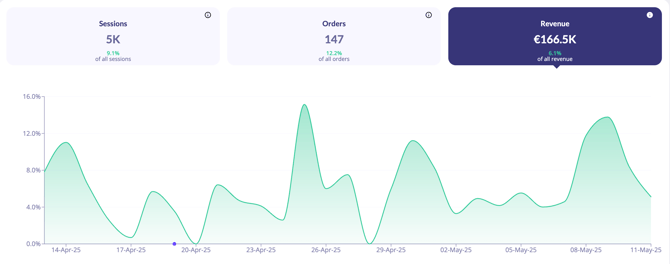
In the Overview section of the 👉 Dashboard, you can monitor the evolution of search sessions, search sessions with clicks, and search-generated revenue over time to better understand overall search performance.
You can view data for any selected date range, grouped by day, week, or month.
The following key metrics help you assess performance at a glance:
- Sessions – The number of sessions in which the user clicked on search products at least once.
- Orders – The number of orders containing at least one product from search results. Only products with user clicks within the search results are considered.
- Revenue – The total revenue from search products. Only products with user clicks within the search results are considered.
🔎 Searches
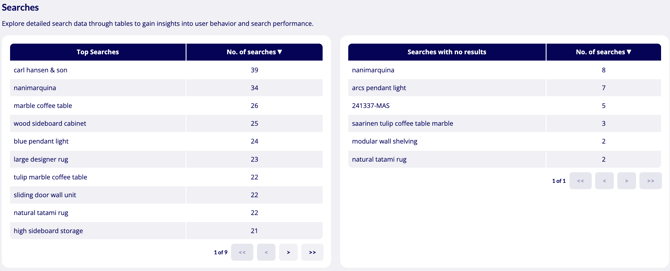
Explore detailed search analytics through dedicated data tables designed to help you better understand shopper behavior, search trends, and overall search performance across your store.
- Top Searches – most often searched products or terms ranked by number of searches
- Searches with no results – products or terms customers search but cannot currently find in your store, ranked by number of searches
⚙️ Other considerations
Attribution Model
Aqurate uses a direct attribution model, meaning that an item is counted as influenced only if it was clicked through an Aqurate Search result and then purchased within 30 days.
In other words:
- The product must be added to the cart after a direct click on a Search result displayed by Aqurate.
- The purchase must occur within the 30-day attribution window.
- Assisted purchases (where a user clicks on a Search result product but then purchases another product) are not included in the metrics.
✅ Summary
Your Aqurate Search Dashboard helps you:
- Track search-driven engagement, conversions, revenue, and overall performance impact through analytics and attribution insights.
- Identify top searches, trending queries, and zero-result searches to better understand customer demand and optimization opportunities.
- Analyze customer search behavior, clicks, and interactions to improve product discovery and search relevance across your store.
Through your Search Dashboard, you can better understand how your customers use search across your store and how it impacts engagement, conversions, and revenue. You can identify popular searches, uncover zero-result queries, and use real customer behavior data to continuously improve product discovery and the shopping experience.